
Google Feud
Google Feud








Google Feud
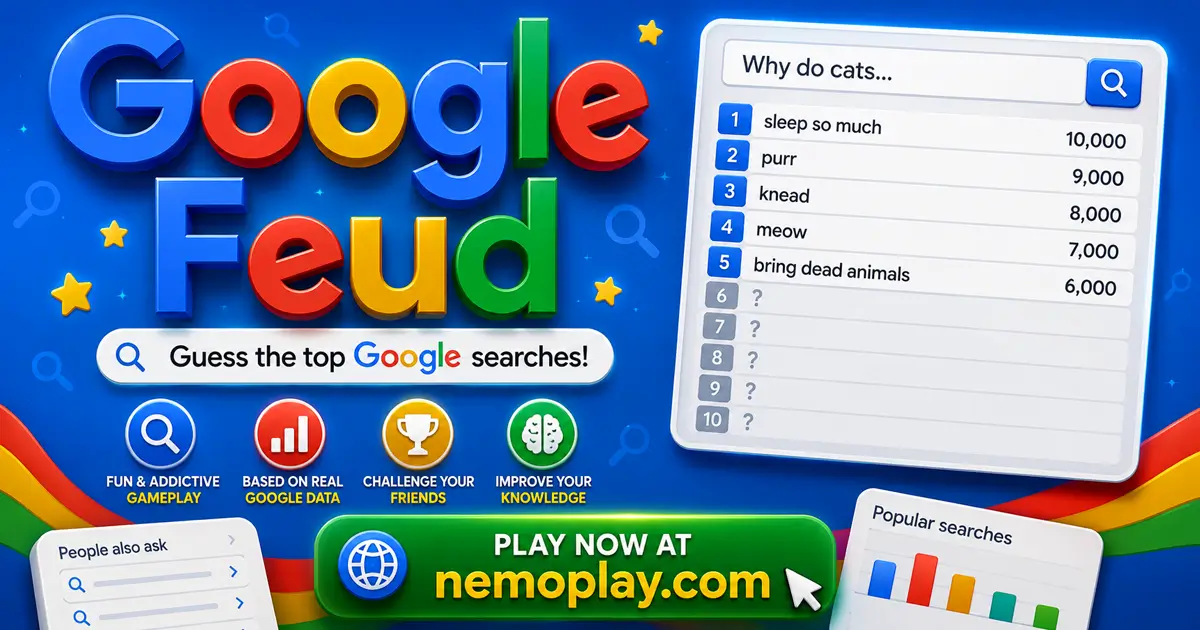
ShareGuess the missing parts of popular Google searches in Google Feud, then use each clue to narrow down what people actually type into the search bar. It plays like a survey showdown: you enter answers, watch the game reveal whether they match common queries, and work carefully because three wrong tries end the round. The twist is its autocomplete focus, so every guess depends on real search behavior, not random trivia.
Google Feud Quick Facts
| Platform | Web Browser |
| Input Method | Mouse click, keyboard typing, and Enter to submit; on-screen controls on touch devices |
| Multiplayer Mode | Single-player |
| Tech Stack | HTML5 |
| Primary Language | English |
| Installation Required | No (Instant Play) |
Why Players Try Google Feud
Guess the most common search phrases that complete each prompt, then see whether your idea matches what many people actually type into the search engine. The game turns everyday search habits into a guessing challenge, so you are not solving puzzles with clues on the screen; you are trying to think like the crowd and predict the next words in a query.
Its hook comes from the mix of familiar topics, surprising answers, and the pressure of limited mistakes, which makes each round feel different even when the format stays the same. It suits players who enjoy quick brain games that reward careful thinking and a good sense of what other people are likely to search for.
Google Feud Mechanics Explained
You start each round by picking a category, and the game immediately gives you a search phrase to complete. You type a guess, submit it, and the game checks whether that answer matches one of the common searches tied to the prompt. If it does, you earn points and can keep building a better score with another valid idea; if it does not, you lose one of your three tries, so every answer choice matters.
Because each round allows only three misses, the pressure comes from deciding whether to play a safe, obvious answer or try a more specific one that might still fit the autocomplete pattern. When the third wrong guess happens, the round ends with no points from that prompt, but a correct match lets you continue pushing for more score before moving on to a new category or question.
Google Feud Browser Play Details
You can play this game directly in your web browser on desktop, laptop, tablet, or mobile.
Getting Started With Google Feud
Start by picking one category, then read the search prompt that appears. Your first job is to think of the most likely ending to that phrase, because the game rewards answers that match what many people search for.
- Choose a category that looks easiest to you first.
- Look at the prompt and say the most common completion in your head before typing it.
- Submit your answer and wait to see if it matches a popular search.
- If it is not found, try another likely answer until you reach the three-try limit for that round.
Google Feud Input Guide
It uses mouse and keyboard input on desktop.
- Mouse click: select a category or button.
- Type: enter an answer.
- Enter: submit the answer.
Mobile and tablet players use the on-screen controls provided by the hosted game.
How to Get Better at Google Feud
Use each round to predict the most common search ending, not the most creative one, because the game rewards answers that match what many people would actually type.
- Start with the most obvious completion first. The game checks common searches, so a simple answer is more likely to score than a clever guess.
- Think about the category before you type. Matching your idea to the topic helps you stay focused on the kind of words people usually search together.
- Use your first tries on broad answers, then make later guesses more specific. This matters because each wrong answer uses one of your limited chances.
- Watch for phrases that sound like everyday questions or familiar facts. Those are the kinds of searches that often show up as valid matches.
- If one guess fails, do not repeat the same idea with tiny changes. Save the remaining tries for a different completion so you have a better chance to find a match.
- Pick the category you understand best when you want a safer round. A familiar topic makes it easier to judge which completion feels most popular.
Google Feud Core Features
The game is built around guessing how search phrases finish, so each round turns a plain prompt into a search-based challenge with visible score results and limited mistakes.
- Four topic categories: culture, people, names, and questions change the kind of prompts you face, so each round asks you to think about a different kind of search.
- Top-search answer list: each prompt has several common completions hidden behind it, and the game reveals matches one by one as you find them.
- Point scoring per match: correct answers earn points, which makes the order and popularity of each guess matter instead of treating every right answer the same.
- Three-strike round limit: after three wrong guesses, the round ends, so every missed answer has a direct cost and pushes you to choose carefully.
- Party-style quiz format: the round structure is built for short turns and shared guessing, which makes it easy to hand the game back and forth between players.
Google Feud Review for New Players
It works best as a quick-thinking quiz because the autocomplete format turns ordinary search phrases into a guessing challenge that rewards common sense more than trivia depth. The strongest part is the pressure created by three mistakes per round, since that limit makes each answer feel important and keeps the score tied to the quality of your guesses.
- Four category groups give each round a different angle, so the prompts change enough to keep the search-guessing loop from feeling identical every time.
- Point-based matching makes popular answers matter more than any correct answer, which pushes players to think about what most people would search rather than what sounds clever.
- Three-strike rounds add real consequence to each missed idea, and that keeps the pace sharp because one weak run can end before the board is fully cleared.
- Browser play on phone, tablet, and PC makes it easy to start a round without setup, but the experience still depends on typing fast enough to stay ahead of the strike limit.
The main limitation is that the scoring and answer patterns can feel unforgiving when your first guesses miss the common search phrasing, so a round may end before the logic clicks. That same design is also what gives it replay value: success depends on reading the category well and choosing answers that match real search habits, not just obvious word associations.
Who Should Play Google Feud?
Google Feud suits players who like making fast guesses from partial prompts and comparing their instincts with what search habits usually look like. It works well if you enjoy light competition, quick rounds, and the kind of pressure where one wrong answer makes the next choice more deliberate. The best sessions are the short, chatty ones where you want to test your judgment and laugh at the unexpected completions the game can reveal.
If you prefer careful thinking over random clicking, this is a good fit; if you want every round to feel predictable, it may frustrate you. The three-miss limit means a rough start can end a prompt quickly, so it suits a mood where you are ready to take a few risks and move on.
Games Like Google Feud
If you enjoy quick rounds of guessing, pattern recognition, and making smart choices under pressure, these games offer a similar mix of challenge and decision-making.
- Wordmeister — A word-building game that rewards finding strong letter combinations and planning moves carefully.
- Words Of Wonders — A crossword-style game where you connect letters to uncover answers and clear each stage.
- Four Colors — A card game centered on matching colors and numbers, with each turn forcing a fast choice.
- Master Chess — A strategy game that asks you to think ahead, read the board, and respond to each move with care.
For more picks in this style, browse our Puzzle Games.
FAQs about Google Feud
Can I switch to a different category after one round ends?
Yes, you can pick a new category or stay with the same one after the round finishes. That lets you move to a topic that feels easier if your first set of guesses was rough.
Do better-matched answers give more points?
Yes, higher-ranked correct answers are worth more points. That means a common guess can score better than a less popular one, so the order of your answers matters.
How many wrong guesses can I make in one round?
Three wrong guesses end the round. This makes each choice important because one careless answer brings you much closer to losing the whole prompt.
Can the game reveal more than one valid answer for the same prompt?
Yes, each prompt can have several valid completions. Finding another matching answer after your first correct guess helps you build a stronger score before the round closes.
The Bottom Line on Google Feud
Google Feud is a great pick if you like short, search-based guessing games that reward quick pattern spotting more than memorizing trivia. It is worth a click when you want a round that feels light at first but gets sharper once you start judging which answers sound most common.
Expect a few surprising completions and the pressure of limited misses, so each guess needs a little thought. If that sounds like your kind of challenge, play it on our site and see how well your instincts match the search bar.