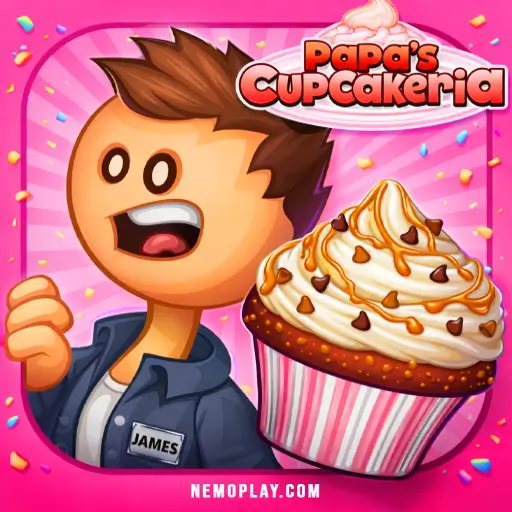
Experience instant fun with Papas Cupcakeria, a delightful no-download browser game that lets you play online for free! This title offers an exciting adventure in cupcake creation, perfect for players of all ages. Enjoy seamless gameplay on Chrome, Safari, and mobile devices, ensuring you can indulge in sweet treats anytime, anywhere. Dive into the world of baking and serve up delicious cupcakes without any hassle!
Technical Specifications for Papas Cupcakeria
| Flipline Studios |
August 2013 |
| Simulation |
Time Management |
| Web Browser (HTML5) |
Mouse |
| Single-player |
Everyone / ESRB E |
| HTML5, JavaScript, Canvas |
English |
| Instant Play |
|
Papas Cupcakeria – Free Online Game
Papas Cupcakeria is a fun cooking game developed by Flipline Studios. It was released on February 28, 2013. In this game, players become cupcake chefs and serve delicious treats to customers.
Key features include:
- Create custom cupcakes with various toppings.
- Manage your own bakery and serve unique customers.
- Earn tips and unlock new recipes as you progress.
- Play for free online, no download required.
- Perfect for kids looking for unblocked games at school.
Enjoy making cupcakes and running your own shop in this exciting game!
Papas Cupcakeria Controls & Physics Explained
In this game, you become a cupcake master! Here’s how to navigate the controls and understand the physics:
- Mouse Control: Use your mouse to click and drag items. This includes selecting cupcake bases, frosting, and toppings.
- Order Station: Customers place their orders here. Click on the order ticket to see what they want.
- Ingredient Selection: Drag ingredients from the shelves to your work area. You can choose from various cupcake bases and decorations.
- Baking Physics: Cupcakes need time to bake! Keep an eye on the timer. If you take too long, they can burn!
- Frosting Application: When applying frosting, hold down the mouse button and move in circles for an even coat. Different frostings have unique textures.
- Topping Placement: Click and drag toppings onto the cupcakes. Be careful not to overcrowd them!
- Serving Customers: Once your cupcakes are ready, drag them to the serving counter. Customers will give you stars based on how well you followed their orders.
Master these controls for a fun and successful baking experience!
Play Papas Cupcakeria Instantly in Browser
You can play this game directly in your web browser on desktop, laptop, tablet, or mobile.
Getting High Scores in Papas Cupcakeria
To score big in this fun game, follow these easy steps:
- Take Orders Quickly: Pay attention to what customers want. The faster you take their orders, the happier they will be!
- Use Fresh Ingredients: Always choose the best ingredients for your cupcakes. Fresh items make your cupcakes taste better.
- Follow Recipes: Stick to the recipes for each cupcake. Mixing the right flavors and toppings is key to impressing your customers.
- Decorate Well: Make your cupcakes look amazing! Use lots of colorful frosting and toppings to earn extra points.
- Serve on Time: Don’t keep customers waiting! Serve their cupcakes as soon as they are ready to keep them happy.
- Keep Customers Happy: If they smile, you’ll get better tips! Always check their satisfaction after serving.
- Practice Makes Perfect: The more you play, the better you’ll get. Learn from each game to improve your skills!
PC Controls for Papas Cupcakeria
Mastering the controls is essential for success in this game. Here’s a breakdown of the basic and advanced controls:
- Mouse Controls: Use the mouse to navigate menus, select items, and place orders.
- Left Click: Interact with objects, such as selecting cupcake bases and toppings.
- Right Click: Cancel an action or deselect an item.
- Scroll Wheel: Zoom in and out of the workspace for better visibility.
- Keyboard Shortcuts:
- A: Access the order station.
- S: Open the cupcake station.
- D: Go to the decoration station.
- F: View customer orders.
- Advanced Controls:
- Shift + Click: Quickly add multiple toppings or decorations.
- Ctrl + Z: Undo the last action if you make a mistake.
Practice these controls to enhance your gameplay and serve up delicious cupcakes efficiently!
Pro Strategies for Papas Cupcakeria
Mastering this game requires skill and speed. Here are some pro strategies to help you excel:
- Prioritize Orders: Always check the order tickets first. Focus on the highest-paying customers to maximize tips.
- Perfect Your Timing: Keep an eye on the timer. The faster you complete orders, the happier your customers will be.
- Use the Right Toppings: Experiment with different toppings to find out what combinations your customers love most.
- Upgrade Wisely: Spend your earned tips on upgrades that improve efficiency, like faster ovens or better mixers.
- Practice Your Icing Skills: Icing is crucial. Practice to ensure you can decorate quickly and beautifully.
- Keep It Clean: A clean workspace can help you move faster. Don’t let messes slow you down!
Papas Cupcakeria Highlights & Modes
Papas Cupcakeria offers a fun and engaging experience for players of all ages. Here are the key features that make it exciting:
- Customizable Cupcakes: Choose from various flavors, toppings, and decorations to create unique cupcakes.
- Order System: Take customer orders and fulfill them accurately to earn tips and unlock new recipes.
- Mini-Games: Play mini-games while waiting for cupcakes to bake, adding more fun to the gameplay.
- Upgrades: Use earned tips to upgrade your shop with new equipment and decorations.
- Seasonal Events: Participate in special events and challenges that change with the seasons.
- Multiple Characters: Unlock and play as different characters, each with their own unique style.
- Achievements: Complete various achievements to earn rewards and show off your skills.
- No Download Required: Enjoy the game online for free, making it accessible anywhere, including school.
Free Browser Version of Papas Cupcakeria
The browser-based version offers an accessible way to enjoy this popular game without any downloads. It’s a browser-adapted version that runs smoothly on various platforms. You can play it on Chrome, Firefox, Safari, and Edge. This version retains all the fun elements of the original while being optimized for online play. Enjoy features like easy navigation, quick loading times, and the ability to save your progress directly in your browser. This makes it perfect for playing at school or anywhere you have internet access.
Full Version of Papas Cupcakeria for Free
You can enjoy free online play without any fees or in-app purchases. All games on this site are completely free, allowing you to dive into the fun without spending a dime. Competitors highlight several benefits of free play, including:
- No financial commitment, making it accessible for everyone.
- Unlimited gameplay, allowing you to practice and improve your skills.
- Easy access from school or home without the need for downloads.
- Constant updates and new features added regularly.
Experience the joy of managing your own cupcake shop without any barriers. Enjoy the full version today!
Papas Cupcakeria Unblocked at School
Play Papas Cupcakeria Unblocked on nemoplay.com. Whether you’re at school, at work, or on a break—you can play without any restrictions. This game is built in HTML5, ensuring it runs smoothly on school Chromebooks and other devices. Enjoy the following benefits:
- No download required—play instantly.
- Accessible from any browser.
- Free to play, making it budget-friendly.
- Compatible with school networks, avoiding typical blocks.
Papas Cupcakeria on GitHub
No need to search on GitHub, our version works on all devices at school or work. Many users look for alternatives on GitHub, but those versions often require downloads or are blocked. Our game is free and unblocked, ensuring you can enjoy it without any hassle.
Save Space: Play Papas Cupcakeria Online
Many fans enjoy playing directly in their browser for an even smoother experience. Here’s how:
- Android: Open the Google Play Store and tap Install.
- iOS: Open the App Store on your iPhone or iPad and tap Get.
- Papas Cupcakeria APK: Android users who can’t use Google Play can find and download the APK from trusted sites to install offline.
- PC Steam: If you like playing on a computer, download the game for free via Steam and enjoy a bigger screen and controller support.
Papas Cupcakeria Extension
The Chrome extension for this game offers several benefits:
- Instant play: Launch the game directly from your browser without navigating to a website.
- Offline mode: Play even when you’re not connected to the internet, ensuring you can enjoy it anytime.
- User-friendly interface: Seamless integration with your browser for easy access.
- Regular updates: Stay current with the latest features and improvements.
For more convenience, you can download the extension here: Chrome extension.
If You Love Papas Cupcakeria, Play This
If you enjoyed Papas Cupcakeria, you’ll love these similar games:
FAQs about Papas Cupcakeria
Is Papas Cupcakeria free to play?
Yes, it is 100% free to play. No download or registration required.
Can I play Papas Cupcakeria at school? (unblocked)
Yes, you can play it at school if it’s unblocked. Many schools allow access to fun online games.
Does Papas Cupcakeria work on mobile/phone?
No, it does not have a dedicated mobile app. However, you can play it on mobile browsers.
Do I need to download Papas Cupcakeria?
No, you don’t need to download anything. You can play directly in your web browser.
Can I play Papas Cupcakeria on Chromebook?
Yes, it works perfectly on Chromebooks. Just open your browser and start playing.
Is there a multiplayer mode in Papas Cupcakeria?
No, there is no multiplayer mode available. It’s a single-player game focused on your cupcake shop.
Are there any cheats for Papas Cupcakeria?
No official cheats exist. However, practice makes you better at serving customers quickly!
Can I save my progress in Papas Cupcakeria?
Yes, your progress is saved automatically. You can pick up where you left off anytime.
Is there a time limit in Papas Cupcakeria?
Yes, you have a time limit to complete orders. Speed is key to keeping customers happy!
Can I customize my cupcake shop in Papas Cupcakeria?
Yes, you can customize your shop with decorations and upgrades as you progress.
Are there different levels in Papas Cupcakeria?
Yes, there are multiple levels and challenges as you advance through the game.
Is Papas Cupcakeria suitable for kids?
Yes, it is very kid-friendly and fun for players of all ages!
Start Playing Papas Cupcakeria Now
Papas Cupcakeria is an exciting game that lets kids unleash their creativity while managing a fun cupcake shop. Players can mix and match flavors, frostings, and toppings to create delicious treats for their customers.
The colorful graphics and engaging gameplay keep players entertained for hours. Each level brings new challenges, making it a great way to improve time management skills while having a blast.
Gather your friends and share the fun! Compete to see who can create the best cupcakes and earn the highest tips. Dive into the sweet world of Papas Cupcakeria today, and let your baking adventure begin!



 Loading...